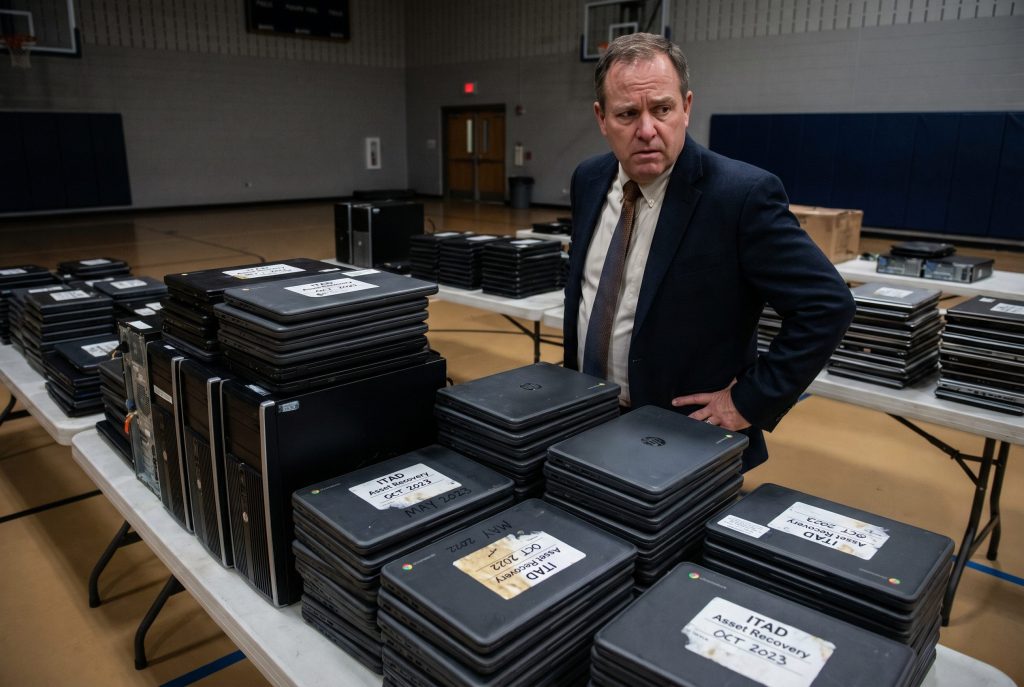
Between 2020 and 2022, U.S. school districts deployed an estimated 50 million Chromebooks to achieve 1:1 student-to-device ratios. In 2020 alone, Google recorded 11.2 million Chromebook sales directly to the education sector. The hardware was purchased rapidly, often within weeks, funded overwhelmingly by federal ESSER (Elementary and Secondary School Emergency Relief) dollars.
Those devices are now reaching the end of their useful lives simultaneously — and the convergence of expired federal funding, Auto Update Expiration deadlines, and FERPA compliance requirements is creating the largest single-device-type disposition event in K-12 history.
The Three Forces Colliding
The ESSER Funding Cliff
The ESSER funding that financed the pandemic-era Chromebook expansion came with non-negotiable congressional deadlines. Districts were mandated to obligate the final round of ARP (American Rescue Plan) funds by September 30, 2024, and to liquidate those funds by January 28, 2025. The stimulus money is gone.
Districts now face what industry analysts call “stimulus-free budgets” — operating budgets that lack the discretionary capital to execute wholesale fleet replacements. Many districts that achieved 1:1 programs for the first time during the pandemic are discovering that maintaining those programs requires a recurring hardware refresh budget that didn’t exist before 2020 and doesn’t exist now.
The immediate consequence for ITAD: districts cannot afford to replace their aging fleets, but the devices are becoming functionally obsolete. The equipment is accumulating — in IT closets, in storage rooms, in warehouses — without a funded plan for disposition.
Auto Update Expiration (AUE)
Every Chromebook has a predefined Auto Update Expiration date set by Google. After AUE, the device stops receiving operating system updates and security patches. More consequentially for districts, post-AUE devices frequently become incompatible with mandated state online testing platforms, rendering them functionally obsolete for core instructional and assessment use regardless of their physical condition.
Because tens of millions of devices were purchased simultaneously between spring 2020 and fall 2021, they are reaching their four-to-five-year AUE deadlines concurrently — throughout 2024, 2025, and 2026. This creates a disposition volume wave of millions of units hitting simultaneously across thousands of districts nationwide.
FERPA Compliance
The third force is regulatory. Every one of those 50 million Chromebooks cached student education records on its internal eMMC flash storage — browsing histories, assessment data, login credentials, behavioral records, locally stored files. Under FERPA (34 CFR Part 99), that data must be rendered permanently irretrievable before the device leaves the district’s control.
As covered in our companion guide (FERPA Compliance for Device Disposal), Google Admin deprovisioning and factory resets do not physically erase eMMC storage. Forensic recovery tools can retrieve student data from “wiped” Chromebooks. For eMMC-equipped devices, NIST 800-88 Destroy — physical shredding — is the defensible FERPA standard.
The collision of these three forces means districts must dispose of unprecedented volumes of devices, without the funding to replace them, while meeting a data destruction standard that most district IT departments have never had to execute at this scale.
Not sure where your district stands? Take the free ITAD Readiness Assessment →
The Scale of the Problem
To appreciate the logistics, consider a mid-size district with 25,000 students and a 1:1 Chromebook program. That district has approximately 25,000 Chromebooks reaching AUE over a two-to-three-year window. At roughly 3 pounds per device, that’s 37.5 tons of equipment that must be inventoried, collected from schools, securely transported, and physically destroyed with serialized documentation for every unit.
Most K-12 IT departments — often staffed with three to five people responsible for everything from helpdesk tickets to network infrastructure — have minimal experience with enterprise-scale reverse logistics and asset disposition. They lack the physical storage space to warehouse thousands of devices, the processing capacity to inventory them at the serial-number level, and the vendor relationships to execute compliant destruction at volume.
The districts that are handling this well started planning before the AUE wave hit. The ones that aren’t are discovering the problem in real time — and their IT closets are filling up faster than they can empty them.
What Happens to the Data
The technical reality of Chromebook data persistence is worth understanding because it drives every decision in the disposition process.
Chromebooks use eMMC flash storage — embedded solid-state memory soldered directly to the motherboard. Unlike a traditional laptop with a removable hard drive, the storage on a Chromebook cannot be extracted and processed independently. The entire device must be destroyed to eliminate the data on its eMMC chip.
When a student uses a Chromebook for a school year, the eMMC storage accumulates a data footprint that includes cached credentials and login tokens from Google Workspace for Education, locally cached documents and files from Google Drive, browsing history tied to the student’s managed account, assessment data from state testing platforms and district-adopted software, behavioral and engagement records from classroom management tools, and in some cases, student health or counseling information accessed through district portals.
Google Admin deprovisioning removes the cloud management profile and clears the user-facing operating system data. But the underlying eMMC flash retains data in areas that the operating system cannot address — wear-leveled blocks, over-provisioned sectors, and unallocated storage space. This is the same technical limitation that affects all solid-state storage, but it’s particularly consequential for Chromebooks because the storage cannot be separated from the device for independent processing.
Disposition Options for Districts
Districts facing the Chromebook wave have several options, each with different compliance, cost, and logistics implications.
Certified Destruction (Physical Shredding)
This is the most straightforward FERPA-compliant option. A certified ITAD vendor collects the devices, transports them under chain of custody to a processing facility, and physically shreds them — including the eMMC storage — producing a serialized Certificate of Destruction for every device.
For Chromebooks at or past AUE with minimal cosmetic value, this is typically the most cost-effective path. The devices have near-zero individual remarketing value (a post-AUE Chromebook that originally cost $300 may be worth $5–15 on the secondary market, if anything), and the cost of certified destruction is often comparable to or less than the per-unit remarketing value.
The key requirement: your vendor must confirm that their shredding process destroys the eMMC storage to a particle size that renders data unrecoverable. Standard hard drive shredders may process Chromebooks at particle sizes that leave eMMC chips partially intact. Confirm the particle size specification with your vendor before engaging.
Trade-In and Remarketing Programs
Several manufacturers and ITAD vendors offer trade-in programs that accept end-of-life Chromebooks in exchange for credit toward new devices. These programs can partially offset the cost of fleet replacement — a meaningful consideration for districts operating without ESSER funding.
The compliance consideration: if a trade-in program remarkets your devices rather than destroying them, the data sanitization must meet NIST 800-88 Purge standards before the devices enter the secondary market. For eMMC storage, Purge-level sanitization requires firmware-level secure erase commands — and not all Chromebook models support these commands reliably. If your vendor cannot verify Purge-level sanitization on your specific Chromebook model, destruction remains the defensible path.
Apple iPads, by contrast, retain significantly higher remarketing value per unit. If your district’s 1:1 fleet includes iPads, trade-in programs (including Apple VPP credits) can generate meaningful value recovery. But the same sanitization requirements apply — factory resets are insufficient for FERPA compliance on any flash-based device.
Donation
Donating functional, sanitized Chromebooks to community organizations, libraries, or after-school programs is an option some districts consider — particularly for devices that haven’t yet reached AUE. The compliance requirement is clear: the devices must be sanitized to NIST 800-88 Purge standard before donation, and the sanitization must be documented with a Certificate of Sanitization. Donating unsanitized devices — even with the best of intentions — creates the same FERPA liability as any other form of improper disposal.
Not sure where your district stands? Take the free ITAD Readiness Assessment →
Logistics for Districts
Executing disposition at the scale of a district-wide Chromebook fleet requires planning that goes beyond engaging a vendor.
Collection logistics. Devices are distributed across every school building in the district. Collecting them requires coordination with building principals and IT contacts at each site, collection schedules aligned with the academic calendar (summer is the primary disposition window for most districts), staging areas at each building for organized collection (not just “pile them in the gym”), and serialized inventory at the point of collection — not at the vendor’s facility. Every device should be logged by serial number as it’s collected from each building.
Storage and staging. If your vendor can’t process all devices immediately, you need a secure staging area. Devices waiting for pickup represent the same data liability as devices in an IT closet — they contain unsanitized student data and must be physically secured.
ESSER asset reconciliation. If devices were purchased with ESSER funds, the disposition process is your last opportunity to reconcile your federal asset records. The serial numbers on your Certificates of Destruction should map back to the purchase records in your ESSER documentation. If your asset tracking was incomplete during the rapid pandemic deployments, the disposition inventory is your chance to close the gaps before a federal audit finds them.
Cooperative purchasing. Many ITAD vendors hold contracts with cooperative purchasing organizations that K-12 districts already use. E&I Cooperative Services, NASPO ValuePoint, BuyBoard (in Texas), and state-level cooperatives can eliminate the need for a district-level RFP — reducing procurement timelines from months to days. Ask prospective vendors which cooperative contracts they hold before assuming you need a formal solicitation.
What Your Vendor Must Demonstrate
For K-12 Chromebook disposition specifically, evaluate vendors on these criteria beyond the standard certification stack:
eMMC destruction capability. Confirm that the vendor’s shredding process addresses embedded flash storage at a particle size that renders data unrecoverable — not just removable hard drives.
Volume capacity. A district-wide Chromebook fleet generates thousands of devices. Your vendor must be able to process this volume within your summer disposition window without bottlenecks that leave devices sitting in limbo.
Serialized documentation. Every device must appear on the Certificate of Destruction by individual serial number. For a 25,000-device fleet, that means a 25,000-line certificate — not a one-line receipt saying “25,000 Chromebooks destroyed.”
Cooperative purchasing contracts. Vendors with existing cooperative agreements dramatically reduce your procurement timeline and administrative burden.
ESSER audit support. If your devices were federally funded, your vendor’s documentation should be formatted to support federal audit requirements — serial-level tracking that maps to your asset inventory and purchase records.
Where You Stand Matters
The Chromebook disposal crisis is not a future problem — it’s happening now, across thousands of districts, with millions of devices reaching AUE deadlines while ESSER funding has expired and IT teams are stretched thin. The districts that handle this well will have planned their disposition before the devices reached end of life, engaged certified vendors with K-12 experience, and produced the serialized documentation that satisfies both FERPA and ESSER audit requirements.
The districts that don’t will discover the problem when devices accumulate beyond their storage capacity, when a parent files a complaint about student data on a resold device, or when a federal auditor asks for documentation that doesn’t exist.
The first step is understanding where you stand today.
Ready to find out? SureDispose’s free assessment evaluates your district’s current practices across FERPA compliance, data sanitization standards, vendor documentation, and chain of custody — and connects you with certified providers experienced in K-12 Chromebook disposition at scale. Take the Assessment →
SureDispose is an independent advisory platform. We connect organizations with vetted ITAD service providers but do not perform disposition services directly. Providers compensate us for qualified introductions.